

8. Zone as Mapping Unit and Neighborhood#
8.1. Map Compute Framework#
Operations:
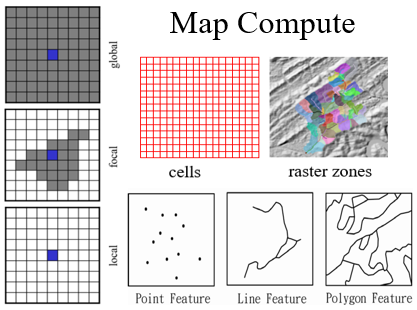
Local, focal, and global operations based on the spatial scope of neighborhood
Neighborhood relation operations
3 kinds of mapping/analysis units:
Cells, raster zones, vector features
Mapping Units |
Neighborhood Relation: Local |
Neighborhood Relation: Focal |
Neighborhood Relation: Global |
|---|---|---|---|
Cells |
Local |
Focal |
Global |
Raster zones |
Local |
Focal |
Global |
Features (vectors) |
Local |
8.2. Topics#
Raster zones as mapping units
Local, focal, and global operations
Raster zones as neighborhoods
Zonal neighborhoods
8.3. Raster Zones#
A raster zone consists of a set of cells with the same condition/attribute or entity/identity.
Acts as one of the 3 mapping units of a map (alongside cells and features).
Often a raster representation of vector features obtained by vector-to-raster conversion.
Examples include land cover types, soil types, or administrative boundaries.
8.4. Raster Zones as Mapping Units#
A map can be viewed as a function where the domain is a set of zones.
Each zone has one or more attribute values.
In ArcGIS, this is typically represented by a Raster Attribute Table (RAT).
Value (Zone ID) |
Count |
LandCover_Type |
|---|---|---|
1 |
450 |
Forest |
2 |
320 |
Water |
3 |
150 |
Urban |
8.5. Local Operations with Raster Zones#
Characterize attributes of the cells within each zone.
The neighborhood is the zone itself.
Operations include:
ReduceSum: Total value of cells in the zone.
ReduceMean: Average value of cells in the zone.
ReduceMax / ReduceMin: Extreme values in the zone.
ReduceVariety: Number of unique values in the zone.
8.6. Focal Operations with Raster Zones#
Modeling interactional relationships between zones.
Requires a neighborhood relationship between zones, such as adjacency or distance.
The output value for a zone depends on the attributes of its neighboring zones.
8.7. Global Operations with Raster Zones#
The output value for a zone depends on all other zones in the map.
Examples include ranking zones by total area or mean elevation relative to the entire study area.
8.8. Raster Zones as Zonal Neighborhoods#
A zone can define a neighborhood for the cells it contains.
Every cell within the same zone shares the same zonal neighborhood.
This is a special type of focal neighborhood where the focus cell’s neighborhood is the entire zone it belongs to.
8.9. Zonal Operations in Map Algebra (MA)#
In Tomlin’s Map Algebra, Zonal Operations are a distinct category.
Requires two input rasters:
Zone Layer: Defines the boundaries.
Value Layer: Provides the data to be processed.
Common tools: ZonalMean, ZonalSum, ZonalMaximum.
8.10. Zonal Operations in the Map Compute Framework (MCF)#
The MCF seeks simplicity by removing Zonal Operations as a separate category (applying Occam’s Razor).
They are treated instead as:
Local operations with zones as MUs (summarizing a zone).
Focal operations with zonal neighborhoods (assigning zonal data back to cells).
8.11. Map Algebra vs. Map Compute Framework#
Zonal operations in MA are grouped by spatial scope.
In MCF, local operations with zonal mapping units are more efficient for summarizing, while focal operations with zonal neighborhoods allow for contrasting focus cells with their surrounding zone.
Operation Type |
Map Algebra (MA) |
Map Compute Framework (MCF) |
|---|---|---|
Summarize Zone |
Zonal Statistics |
Local (Zone as MU) |
Zone-based Focal |
Sub-zone operations |
Focal (Zonal Neighborhood) |
8.12. Summary: Parity and Parsimony#
Occam’s Razor: The MCF uses the smallest set of elements to explain spatial analysis.
Zonal operations are redundant because they can be described using local or focal definitions.
This framework allows for additional possibilities, such as global operations applied specifically to zonal mapping units.
8.13. Map Algebra vs Map Compute#
Zonal operations in Map Algebra (MA)
Raster operations are grouped as local, focal, and zonal according to the spatial scope of the operations.
Equivalent operations in Map Compute Framework (MCF)
Local operations with zonal mapping units: Zone raster defines the MUs.
Focal operations with zonal neighborhoods: Zone raster defines and stores zonal neighborhoods.
8.14. No Zonal Operations in MCF#
Occam’s (or Ockham’s) razor
Principle that searches for explanations constructed with the smallest possible set of elements.
It is also known as the principle of parsimony or the law of parsimony.
No zonal operations in MCF
Zonal operations can be performed using local operations with raster zones as MUs or focal operations with zonal neighborhoods (a special neighborhood).
Additional operations (compared with MA)
Focal and global operations with zonal MUs.
Neighborhood relation operations with zonal neighborhoods.
8.15. ArcGIS Zonal Toolset#
Local operations with raster zone MUs
Zonal geometry, histogram, statistics.
Zonal fill: Finds the minimum value on a zone’s edge (LocalReduce operation using both location/edge and value).
Tabulate area: LocalCombine operation.
Zone as neighborhoods
These are not explicitly implemented as focal operations in ArcGIS.
Block statistics tools provide some functional overlap.
8.16. Siren Population Coverage Analysis Example#
Problem: Determine the population covered by emergency sirens (5800 feet range).
Approach: Compare vector vs. raster data models for this spatial analysis.
8.17. Siren Population Coverage Analysis in Vector Data Model#
Circle neighborhood: A buffer is created for each siren point.
Neighborhood relation operation (NbrLocation):
Combine all the individual circle neighborhoods together into a single multi-part coverage polygon.
Effective neighbors:
Intersect the coverage polygon with census blocks to identify the overlapping areas.
Local sum:
Sum the population from the effective neighbor census blocks.
8.18. Population Coverage Analysis in Vector (ArcGIS Workflows)#
Workflow A (Manual steps):
Generate and dissolve buffers.
Intersect dissolved buffers with census blocks to get effective neighbors.
Calculate effective neighbor population.
Sum effective neighbor population.
Workflow B (Automated tool):
Summarize Within: Performs these steps automatically under the hood.
8.19. Calculate Siren Zone Raster Layer#
Each siren point or cell has a 5800 feet neighborhood.
Neighborhood relation operation (NbrLocation):
Combines all the cells within any neighborhood to define a single raster zone representing the Coverage Area.
8.20. Vector vs Raster Analysis Summary#
Raster analysis:
Applies an arbitrary spatial resolution.
Requires choosing an appropriate cell size to balance processing time and accuracy.
Risk of missing small polygons if the cell size is too large.
Vector analysis:
Performs analysis at the original data resolution.
MCF Unified Approach:
Provides the same conceptual workflow and operations regardless of whether a vector or raster data model is used.