

7. Focal Operation#
7.1. Focal Operations#
Operations:
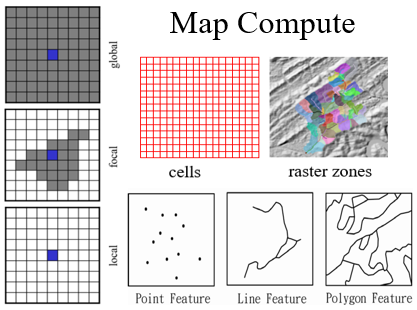
Local, focal and global operations based on the spatial scope of neighborhood
Neighborhood relation operations
3 kinds of mapping/analysis units:
Cells
Raster zones
Features
Mapping Units |
Neighborhood Relation: Local |
Neighborhood Relation: Focal |
Neighborhood Relation: Global |
|---|---|---|---|
Cells |
Local |
Focal |
Global |
Raster zones |
Local |
||
Features (vectors) |
Local |
7.2. Topics#
Focal operations with raster map
Moving-window, distance/direction based, irregular weighted neighborhoods
Focal operations with vector map
Buffer
Domain-based focal neighborhoods
Watershed
Types of focal operations
7.3. Focal Operations#
Compute for each output MU with the neighbors of its focal neighborhood
Cells, raster zones, vector features as MUs
Data manipulation within MU’s focal neighborhood
7.4. Focal Neighborhood#
A set of locations that has a certain relationship with a MU
Beyond the MU itself (vs local neighborhood)
Represents interactional relationship between a MU and other locations
Exchange of matter, energy, and information
The MU is also referred to as the neighborhood focus
The related locations are referred to as the neighbors
7.5. Characterizing Focal Neighborhoods#
Two ways to characterize focal neighborhoods:
Based on distance and direction
Moving-window (raster), Buffer (vector/raster)
Based on domain knowledge/processes
Watershed, viewshed, network, etc.
7.6. Moving-Window Neighborhoods#
Neighborhood defined by a “window” of a specific shape and size
The window “moves” from cell to cell
Neighborhood is same for all cells (relative to the focus)
Types:
Square (3x3, 5x5, etc.)
Circle
Plus (rook’s case)
7.7. Focal Statistics#
Calculate a statistic for the values within the moving window
Common statistics:
FocalSum: Total value (e.g., total biomass)
FocalMean: Average value (smoothing)
FocalMax/FocalMin: Range or edge detection
FocalVariety: Number of unique values (diversity)
7.8. Examples of Moving-Window Operations#
Smoothing: Use FocalMean to reduce noise in data
Edge Detection: Use FocalMax - FocalMin to find where values change rapidly
Focal Variety: Useful for identifying boundaries between different land cover types
7.9. Morphology/Shape Analysis#
Use Focal operations to analyze the shape of features
Erosion: Using FocalMinimum on a binary map
Removes outer layer of pixels
Expansion/Dilation: Using FocalMaximum on a binary map
Adds an outer layer of pixels
7.10. Morphology/Shape Analysis (cont.)#
Inner Boundaries: Identify cells that are part of the feature but touch the background
Outer Boundaries: Identify background cells that touch the feature
Combined boundaries provide detailed structural analysis
7.11. Distance/Direction-Based Neighborhoods#
Neighborhood defined by specific distance and directional parameters
Neighborhoods in ArcGIS:
Rectangle, circle, annulus (donut), or wedge (a slice of a circle)
7.12. Finding Appropriate Wind Farm Sites#
Selection criteria:
Wind speed: Higher elevation generally equals higher speed (Elevation >= 1000m)
Aspect: Facing the prevailing wind direction
Wind exposure: Not blocked by nearby hills in the prevailing wind direction
Data needed:
Prevailing wind direction (e.g., 225° to 315°)
Digital Elevation Model (DEM)
Wedge neighborhood: Used to check for obstructions in the specific wind direction
7.13. Types of Focal Operations#
Simple Focal Operations: Neighborhood is predefined (shape/size)
Example: Moving window
Irregular/Weighted Focal Operations: Neighbors have different “weights” or importance
Example: Gravity model, Kernel density estimation
Process-based Focal Operations: Neighborhood is defined by a physical process
Example: Watershed (defined by terrain/gravity)
7.14. Irregular Weighted Neighborhood#
Neighborhood and weights are defined by a matrix
0s indicate a location is not a neighbor
Other values represent weight (neighbor relation property)
Matrix can be stored as a neighborhood text file
Kernel file in ArcGIS
All cells use the same neighborhood structure
Operation: Weighted Summary
Get the neighbor value from the input map
Summarize (weight * value)
7.15. Weighted Moving-Average (Smoothing)#
Weights are inversely proportional to distance
The weight for the focus MU is typically the largest
Used to reduce noise while preserving more detail than a simple mean
7.16. Kernel Density Estimation (KDE)#
Neighborhood is a circle with a radius (bandwidth)
Weights are defined by a continuous kernel function
Weight is highest at the center and decreases to zero at the boundary
Operations:
Calculate weighted value for each neighbor (Weight * Value)
Sum all weighted values
Normalize (optional)
7.17. Process-Based Focal Neighborhoods#
Neighborhood is defined by a physical or social process
Examples:
Watershed: Neighborhood defined by terrain and gravity (flow of water)
Viewshed: Neighborhood defined by line-of-sight and topography
Service Area: Neighborhood defined by travel time on a road network
7.18. Watershed as a Focal Neighborhood#
A watershed is a neighborhood where all locations drain to a common outlet (focus)
Interaction: Water, sediment, and pollutants move from neighbors to the focus
Neighborhood is irregular and varies from location to location
7.19. Types of Focal Operations (Based on Output)#
Three types of focal operations based on what the output value represents:
Characterize focal neighborhood
Compare focus MU and its neighbors
Predict attribute at the focus MU
7.20. Type 1: Characterize Focal Neighborhood#
The output value summarizes the attributes within the neighborhood
Focal Statistics:
FocalSum: Total amount
FocalMean: Average intensity/density
FocalMax/FocalMin: Extremes
FocalVariety: Diversity/Heterogeneity
FocalMajority: Dominant type
7.21. Type 2: Compare Focus MU and Neighbors#
The output value represents the relationship or contrast between the focus and its surrounding area
Operations:
ContrastLocation: Distance to specific neighbors
ContrastValue: Difference between focus value and neighborhood mean
FocalPercentage: Percentage of neighbors with values equal to the focus
FocalPercentile: Percentage of neighbors with values less than the focus
7.22. ContrastValue Operation Examples#
FocalPercentage:
Measures the homogeneity of the focus relative to its neighbors
FocalPercentile:
Identifies if a focus MU is a local peak (high percentile) or local pit (low percentile)