

9. Global Operations, Effective Neighborhoods, and Analysis MUs#
9.1. Topics#
Global neighborhood and operation
Effective neighborhood and neighbor
Setting output/analysis mapping unit
9.2. Global Neighborhoods#
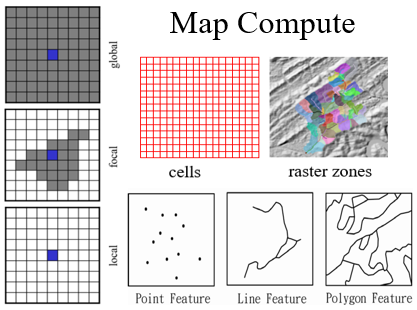
A local neighborhood is the focus MU itself; each neighborhood is unique and there is no overlap in space.
A focal neighborhood goes beyond the focus MU; neighborhoods may overlap in space.
Global neighborhood:
All MUs have the same neighborhood.
Includes all the MUs in the map (or otherwise specified extent).
9.3. Global Operations#
Operations that characterize the entire map.
Compute a new map where the value for each MU is a function of all values on the input map(s).
Global Statistics: GlobalMin, GlobalMax, GlobalMean, GlobalStandardDeviation.
\(Value_{new} = f(Values_{global})\)
9.4. Euclidean Distance as a Global Operation#
Euclidean distance is a global operation because the distance to the nearest source depends on the locations of all source features across the entire map.
Every cell in the output raster receives a value representing the distance to the closest source.
9.5. Effective Neighborhood and Neighbors#
A focal neighborhood can be very large (e.g., a large buffer or a large watershed).
Effective neighbors: The subset of neighbors that actually exist or contain data within the defined neighborhood.
In vector data, a neighborhood (like a circle) might overlap multiple census blocks; those blocks are the effective neighbors.
9.6. Characterizing Effective Neighborhoods#
Characterize neighbor attribute(s) and geometry:
LocalCount, LocalSum, LocalStats.
Line length, polygon area.
Characterize neighbor location:
Mean center (the “center of gravity” for the neighbors).
Characterize neighbor attribute(s) and location:
Weighted mean center.
9.7. Setting Analysis/Output Mapping Units#
How to define the MUs for the output map when performing an operation.
Usually, the output MUs are:
Same as the input MUs (most local and focal operations).
Defined by a specific layer (e.g., using census blocks as the analysis units for a point-in-polygon operation).
Created by the intersection of multiple input maps (e.g., vector overlay).
9.8. Block Statistics in ArcGIS#
Performs a neighborhood operation that computes an output where the value for each non-overlapping “block” is a function of the input.
In the Map Compute Framework, this is viewed as:
Blocks = raster zones.
LocalStatistics with blocks as MUs.
9.9. Setting Output MUs with Two Input Vector Maps#
Vector overlay tools define output MUs based on geometric intersections:
Intersect: Keeps only areas common to both.
Identity: Keeps all areas of the first input, and only overlapping parts of the second.
Union: Keeps all areas from both inputs.
Symmetrical Difference: Keeps areas in either input, but not both.
Erase: Removes areas of the input that overlap the erase features.
9.10. Point Statistics Tool in ArcGIS#
The tool performs a neighborhood operation where the value for each output cell is a function of the input point features falling within a specified neighborhood.
This is a focal operation where the analysis unit is a cell, but the input data comes from point features.
9.11. Summary of Analysis Units#
Choice of MU impacts the results (The Modifiable Areal Unit Problem - MAUP).
Local operations can involve a change in MUs (e.g., aggregating points into polygons).
Vector overlay is essentially a process of generating a new set of analysis MUs that inherit attributes from multiple sources.