

10. Neighborhood Relation Operations, Connectivity, and Distance Analysis#
Topics:
Neighborhood Relation Operations
Spatial Connectivity Analysis
Distance Analysis
10.1. Map Compute Framework#
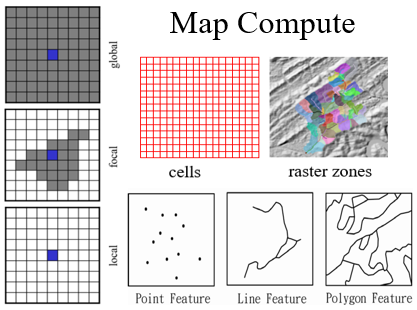
Three kinds of analysis/mapping units (MUs) in maps:
Cells, raster zones, and features
Four kinds of operations:
Local, focal, and global operations based on the spatial scope of the neighborhood
Neighborhood relation operations
Mapping Units |
Neighborhood Relation: Local |
Neighborhood Relation: Focal |
Neighborhood Relation: Global |
|---|---|---|---|
Cells |
Local |
Focal |
Global |
Raster zones |
Local |
Focal |
Global |
Features (vectors) |
Local |
10.2. Neighborhood Relation Operations#
Local, focal, and global operations manipulate the data within the neighborhood associated with a focus MU.
Neighborhood relation operations characterize all the neighborhoods associated with the MUs on a map.
Example: NbrLocation represents the location covered by all the neighborhoods of a set of features (points, lines, or polygons).
10.3. Siren Population Coverage Analysis (Vector Data Model)#
Circle neighborhood is created for each siren point.
Location covered by all neighborhoods is found by combining all circle neighborhoods into a multi-part coverage polygon.
This is a neighborhood relation operation (NbrLocation).
Local sum is performed using combined buffers as the mapping unit.
Effective neighbors are found by intersecting the coverage polygon with census blocks.
10.4. NbrLocation with Raster Distance Neighborhoods#
The operation can be performed with raster data using distance-based neighborhoods.
Example: A neighborhood defined by distance d <= 3 cell units.
10.5. Buffer Tool as a Neighborhood Relation Operation#
The Buffer tool in GIS is a neighborhood relation operation where the buffer is the neighborhood of each feature.
It creates an output map as a single multi-part polygon representing the location covered by at least one neighborhood.
Alternatively, it can create a set of isolated polygons, each with a unique ID.
10.6. NbrLocationFrequency Operation#
For features: Calculates the frequency of a location that belongs to overlapping neighborhoods.
ArcGIS Pro Tool: “Count Overlapping Features” generates planarized overlapping features with a count written to the output.
For cells: A value raster specifies MUs.
Neighborhoods can include “+”, 3x3 window, zonal, or watershed neighborhoods.
10.7. Degree of Neighborhood Overlapping (NbrOverlapDegree)#
Quantifies the degree of neighborhood overlapping.
For 2 neighborhoods: (Area of Intersection) / (Area of Union), resulting in a value between 0 and 1.
For more than 2 neighborhoods: (Frequency weighted area of locations with frequency >=2) / (Area of locations with frequency >=1).
Typical values:
Local neighborhoods: 0 (no overlap).
Focal neighborhoods (3x3 window): approximately 0.27.
Zonal neighborhoods: example value of 0.52.
Global neighborhoods: always 1.
10.8. MU Graph Through Neighborhoods (NbrGraph)#
An NbrGraph operation forms a mapping unit spatial graph through MU neighborhoods.
A neighborhood defines a relationship where a MU is “connected” to its neighbors, forming a link.
Interactions can occur:
When a MU is in another MU’s neighborhood.
When a MU’s neighborhood co-locates with the neighborhood of another MU (e.g., buffers overlap).
MUs act as nodes with geographical locations, and links among MUs have weights characterizing their relation.
10.9. Spatial Connectivity Analysis#
Connectivity analysis identifies groups of connected MUs, known as sub-graphs or components.
MU graphs can be formed by various neighborhoods:
Spatial adjacency (4- or 8-connectivity).
Distance-based neighborhoods.
Watershed or Viewshed.
10.10. Spatial Adjacency as Neighborhood#
A cell is spatially adjacent to its immediate neighbors.
4-adjacency (“+” neighborhood): Cells sharing an edge.
8-adjacency (3x3 window neighborhood): Cells sharing an edge or a point.
Adjacency usually exists between cells with the same value (e.g., foreground vs. background).
10.11. Identifying Connected Regions (RegionGroup)#
RegionGroup identifies and groups connected cells with the same value into regions.
A zone consists of all cells with the same value.
A region (or component) consists of cells that have the same value AND are spatially connected.
Each unique region is assigned a unique ID number.
10.12. Connectivity with Distance-Based Neighborhoods#
Connectivity can be defined by distance rather than just adjacency.
A 1-cell radius circle is equivalent to 4-adjacency.
A square root of 2 cell size radius is equivalent to 8-adjacency.
Cells may be connected even if not immediately adjacent, depending on the neighborhood radius used.
10.13. Nearest Neighbor Connectivity for Features#
The nearest point can be defined as the neighborhood of a point.
This forms a directed graph since nearness is not always symmetric.
Sub-graph analysis then groups these points, lines, or polygons based on these connections.
10.14. Euclidean Distance and Direction#
Euclidean Distance: Calculates the straight-line distance to the nearest source.
Euclidean Direction: Calculates the direction (in degrees) to the nearest source.
These are treated as Global Operations within the framework.
10.15. Cost Distance Analysis#
Movement cost varies across a friction surface.
Accumulated Cost Surface: A global operation determining the minimum cost to reach a source.
Identify the least-cost path based on the accumulated surface.
10.16. Proximity Regions (Thiessen Polygons)#
A neighborhood relation operation where the study area is divided into regions based on the nearest source feature.
Boundaries are the perpendicular bisectors of the lines connecting neighboring source points.
10.17. Identity of the Nearest Source Zone#
Every cell receives the ID of the nearest source feature.
This is also referred to as “Allocation” in GIS software.
In this operation, cells are the mapping units and the neighborhood is the nearest source zone.